Interface Builder shows user-visible messages in three places:
1. **Toast** — a short notification that pops up in a corner of the view.
2. **Inline alert** — a coloured box that replaces the form after submission.
3. **Full-page message view** — takes over the view and offers Retry / Go Back buttons.
You decide which one appears by combining the button's settings with the shape of the response your API returns.
## Do I need `oneclick_data`?
No — not for a plain toast. **A toast can come from several simpler shapes**; the `oneclick_data` envelope is only required when you want:
- a **redirect** (navigate the user to another view) on a URL button or a form submit, or
- a **full-page message view** (on a view data source or on a form submission error).
For a plain toast — success or error — a top-level response with a `message` is enough. For URL buttons, even a plain text body (not JSON) works.
## Two-minute recipes
Pick the row that matches your situation.
| I want… | Button setup | Return from API |
|---|---|---|
| A success toast after form submit | Form Submit, **After submission = Wait for response** | `{ "message": "Saved." }` |
| A coloured toast with a title | same | `{ "message": "Profile is up to date.", "title": "Saved", "variant": "success" }` |
| Replace the form with a "thank you" screen | same + **Show message after submission** ON | same shape as above |
| Navigate to another view after submit | Form Submit, **After submission = Wait for response** | `{ "view_id": "receipt-view" }` |
| Show a toast, then navigate | same | `{ "oneclick_data": { "message": "Done.", "redirect_view": { "id": "receipt-view" } } }` |
| Error toast on failed submit | same + **non-2xx** HTTP status | `{ "message": "Email already in use." }` |
| Full-page error after failed submit (view with a data source) | same + **non-2xx** HTTP status | `{ "oneclick_data": { "error_message": { "title": "Blocked", "message": "…" } } }` |
| Quick toast after URL button click | URL Button | plain string body: `"Added to cart"` — **or** `{ "message": "Added to cart" }` |
| Redirect after URL button click | URL Button | `{ "oneclick_data": { "redirect_view": { "id": "next" } } }` |
| Toast then redirect after URL button click | URL Button + **Wait page transition** ON | Stream interim toasts via the polling endpoint, then return `{ "oneclick_data": { "redirect_view": { "id": "next" } } }`. URL buttons drop a sibling `message` next to `redirect_view`. |
| Full-page error on view data source | View with a data source | `{ "oneclick_data": { "error_message": { "title": "…", "message": "…" } } }` |
The rest of the page explains each case in detail.
---
## Form submit responses
For form submits the submit button's **After submission** setting decides what the builder does with your response.
### After submission = Wait for response
All the shapes below are accepted. Return the simplest one that fits.
**Just a toast** — return a JSON body:
```json
{ "message": "Profile saved" }
```
**Coloured toast** — add a variant:
```json
{ "message": "Profile saved", "variant": "success" }
```
`variant` can be `default`, `destructive`, `info`, `success`, or `warning`.
**Toast with a title** — add a title:
```json
{ "message": "Profile is up to date.", "title": "Saved", "variant": "success" }
```
- With **Show message after submission** off → shown as a toast where `title` is the bold first line and `message` is the description.
- With **Show message after submission** on → the form is replaced by an inline alert containing the title and message. The view scrolls to it automatically.
**Just a navigation** — no message, just send the user to another view:
```json
{ "view_id": "target-view" }
```
**Toast plus navigation** — return the `oneclick_data` envelope. This is the only shape that carries both:
```json
{
"oneclick_data": {
"message": "Saved.",
"redirect_view": { "id": "receipt", "params": { "order_id": "4321" } }
}
}
```
### After submission = Select view
The button navigates on its own once the server replies. You usually need no body at all — HTTP 2xx is enough. If you want a toast to flash just before the navigation, return one of these:
```json
{ "message": "Saved." }
```
```json
{ "success": "Saved." }
```
```json
{ "oneclick_data": { "message": "Saved." } }
```
All three produce a success toast and then the navigation.
### Submit errors
Return any non-2xx HTTP status. The accepted bodies are:
| Body | What the user sees |
|---|---|
| `{ "message": "…" }` | Error toast with the message |
| `{ "oneclick_data": { "message": "…" } }` | Error toast with the message, plus a trailing "Something went wrong" toast (the body has no top-level `message`, so the unconditional fallback toast also fires) |
| `{ "oneclick_data": { "message": "…", "redirect_view": {…} } }` | Error toast, then navigation |
| `{ "oneclick_data": { "error_message": "…" } }` | Full-page message view replaces the view, plus a trailing "Something went wrong" toast in the corner |
| `{ "oneclick_data": { "error_message": { "title": "…", "message": "…", "hideRetry": false, "hideBack": false } } }` | Full-page message view with your title and message, plus a trailing "Something went wrong" toast in the corner |
| Anything else | Generic "Something went wrong" toast |
The submit button re-enables on error unless you turned on **Disable form after submission**.
---
## URL button responses
URL buttons accept any of these. Two of the shapes only render their toast when **Wait page transition** is enabled on the button — see [URL button quirks](#url-button-quirks) below.
**A plain text body** (not JSON) — shortest path:
```
"Added to cart"
```
Shown as a success toast. You may include inline HTML inside the string (see [HTML support](#html-support)).
**JSON with a top-level `message`** — still no envelope needed:
```json
{ "message": "Added to cart" }
```
Also shown as a success toast.
**Envelope with a message**:
```json
{ "oneclick_data": { "message": "Added to cart" } }
```
Renders a success toast **only when Wait page transition is on**. If the button does not use Wait page transition (the default), this body is silently dropped — the user sees no toast. Prefer the top-level `{ "message": "…" }` shape for plain toasts and reach for the envelope only when you also need a redirect or are already streaming interim updates through the polling endpoint.
**Envelope with a redirect** — the envelope is *required* for this:
```json
{
"oneclick_data": {
"redirect_view": { "id": "receipt-view", "params": { "order_id": "4321" } }
}
}
```
Silent navigation.
**Envelope with both** — only the redirect runs:
```json
{
"oneclick_data": {
"message": "Payment successful",
"redirect_view": { "id": "receipt-view" }
}
}
```
URL buttons navigate as soon as a `redirect_view` is present and **silently drop** the sibling `message`. To show a message and then navigate, enable **Wait page transition** on the button and stream the toast through the polling endpoint before returning the final response with `redirect_view`. (Form submits behave differently — they show both the toast and then navigate; see [Form submit responses](#form-submit-responses).)
**Errors**: any non-2xx status becomes an error toast. The message comes from the body if it is a plain string or a `{ "message": "…" }` object; otherwise the generic failure message is shown. The button re-enables so the user can try again.
### URL button quirks
URL buttons handle the response in two stages: an immediate handler for the very first response, plus an optional polling loop that runs only when **Wait page transition** is on. Because of that split, the envelope `{ "oneclick_data": { "message": "…" } }` only surfaces in the polling-aware path:
- **Wait page transition off** (the default): only the immediate handler runs. Plain string bodies and top-level `{ "message": "…" }` produce a toast; envelope-only `oneclick_data.message` is silently dropped.
- **Wait page transition on**: the button polls for interim updates (each one becomes a `toast.info`) and at the end shows the final response's `oneclick_data.message` as a `toast.success`. If your final (immediate) response carries both a `message` and a `redirect_view`, the message is dropped — only the redirect runs. Polled responses can carry both, in which case the polled message still shows as `toast.info` just before the redirect.
URL buttons never render `title` or `variant` — the toast is always a success toast (or, on errors, an error toast). Those fields only take effect on form submits.
---
## View data source error
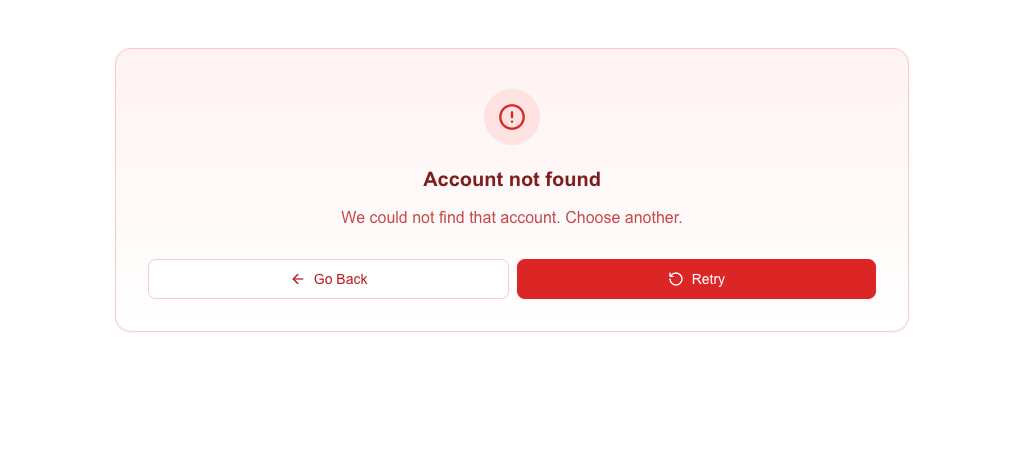
When a view has a data source URL, the response fills the Data Picker's Custom tab. If you need to show an error instead of data — for example "Account not found" — return this shape (and the envelope **is** required):
```json
{
"oneclick_data": {
"error_message": {
"title": "Account not found",
"message": "We could not find that account. Choose another."
}
}
}
```
The view shows a full-page message view with your title and message plus **Retry** and **Go Back** buttons. Add `"hideRetry": true` or `"hideBack": true` to hide either button.
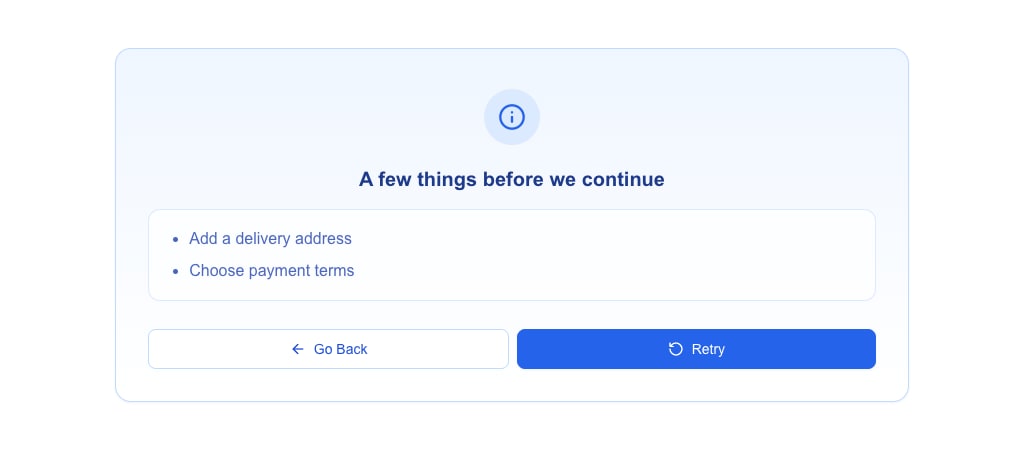
 To list several things the user must fix, send `message` as an array of strings. The message view shows them as a bullet list. Add `variant` to change the colours and icon of the message view — `destructive` (default), `warning`, `info`, `success` or `default`:
```json
{
"oneclick_data": {
"error_message": {
"title": "A few things before we continue",
"message": ["Add a delivery address", "Choose payment terms"],
"variant": "info"
}
}
}
```
`variant` changes the look only. The buttons stay **Go Back** and **Retry**, and the response still counts as an error.
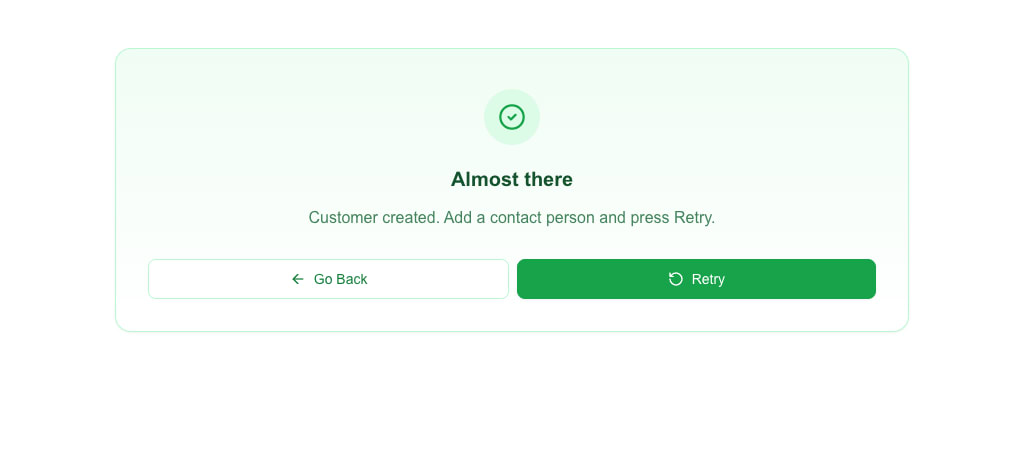
 When the message view is not an error, send it as `message_view` instead of `error_message`. The fields and the view are the same; the name just reads better for a `success` or `info` note. `message_view` takes the object form only:
```json
{
"oneclick_data": {
"message_view": {
"title": "Almost there",
"message": "Customer created. Add a contact person and press Retry.",
"variant": "success"
}
}
}
```
 If you only need a single-line message, the string form also works:
```json
{ "oneclick_data": { "error_message": "Something went wrong" } }
```
The same message view also appears when a form submit on this view returns `oneclick_data.error_message` or `oneclick_data.message_view`.
---
## title and variant belong at the top level
:::caution[Common mistake]
The `oneclick_data` envelope **does not carry `title` or `variant`** — its allowed fields are only `message`, `redirect_view`, `error_message`, `message_view`, and `event_id`. Putting `title` or `variant` inside `oneclick_data` is silently ignored. (The `variant` inside the `error_message` or `message_view` object is a different field: it sets the look of the full-page message view.)
:::
If you write:
```json
{ "oneclick_data": { "message": "Done", "title": "Saved", "variant": "success" } }
```
the `title` and `variant` are silently ignored.
Put them at the top level instead:
```json
{ "message": "Done", "title": "Saved", "variant": "success" }
```
:::caution[URL-button toasts ignore title and variant]
This top-level shape is only read on form submits with **Wait for response**. URL buttons do not support titles or variants — the toast always renders as a success toast regardless.
:::
---
## HTML support
Every `message` and `title` — whether at the top level or inside `oneclick_data` — passes through a narrow HTML allowlist before rendering. You can use a small subset:
```
/ bold
/ italic
underline
line break
inline monospace
link (opens in a new tab)
paragraph
generic wrapper
/ / - lists
```
Anything else is stripped. Links are sanitised: only `https:`, `http:`, `mailto:`, and `tel:` URLs survive; `javascript:` and other schemes are removed. A link left with no URL, an empty one, or a bare `#` shows as plain text. Event-handler attributes (`onclick`, `onerror`, …) are stripped from every tag.
Full rules are in the [Messages & Toasts reference](/docs/buttons/interface-button/interface-builder/reference/data-binding/messaging).
---
## Picking a variant
Set `variant` to match the nature of the message. Variants only take effect in form-submit responses — URL buttons and `oneclick_data.message` always render as success toasts.
| Variant | Use when |
|---|---|
| `success` | Operation completed normally |
| `info` | Neutral informational message |
| `warning` | Non-fatal problem the user should know about |
| `destructive` | Error the user needs to fix |
| `default` | Same as `success` — use when the colour does not matter |
---
## Quick reference
| Situation | Minimal response | Optional/fancier response |
|---|---|---|
| Form submit (Wait for response), plain toast | `{ "message": "…" }` | `{ "message": "…", "variant": "…" }` |
| Form submit (Wait for response), toast with title | `{ "message": "…", "title": "…" }` | add `"variant"` |
| Form submit (Wait for response), replace form | same as above + **Show message after submission** on | |
| Form submit (Wait for response), navigate | `{ "view_id": "…" }` | `{ "oneclick_data": { "redirect_view": {…} } }` |
| Form submit (Wait for response), toast + navigate | `{ "oneclick_data": { "message": "…", "redirect_view": {…} } }` | — |
| Form submit (Select view), toast before navigation | `{ "message": "…" }` or `{ "success": "…" }` | `{ "oneclick_data": { "message": "…" } }` |
| Form submit error | non-2xx + `{ "message": "…" }` | non-2xx + `{ "oneclick_data": { "error_message": {…} } }` for a full-page message view |
| URL button, plain toast | `"…"` (plain string body) or `{ "message": "…" }` | `{ "oneclick_data": { "message": "…" } }` only with **Wait page transition** on |
| URL button, redirect only | `{ "oneclick_data": { "redirect_view": {…} } }` | — |
| URL button, toast then redirect | **Wait page transition** on; stream toasts via the polling endpoint, then return `{ "oneclick_data": { "redirect_view": {…} } }` | — (a sibling `message` next to `redirect_view` is dropped) |
| View data source error (full-page message view) | `{ "oneclick_data": { "error_message": "…" } }` | `{ "oneclick_data": { "error_message": { "title": "…", "message": "…" } } }` |
---
## See also
- [HTTP Response Format](/docs/buttons/interface-button/interface-builder/reference/data-binding/http-response-format) — every response shape the builder accepts.
- [Messages & Toasts reference](/docs/buttons/interface-button/interface-builder/reference/data-binding/messaging) — exact HTML allowlist and link sanitisation rules.
- [Configuring Form Submission](/docs/buttons/interface-button/interface-builder/how-to/forms/form-submission) — the submit button settings that pair with these responses.