URL Button Flow
What a URL button does
Section titled “What a URL button does”A URL button (Button block with Button Type = URL) sends an HTTP request to your endpoint when clicked, then reacts to the response. Unlike a Form Submit Button there is no form payload — the button posts whatever you configured under Button body data.
Two things make URL buttons different from a regular <a href>:
- The response can be more than “page navigated” — it can be a toast, a redirect to another view, a message view, or a stream of follow-up messages.
- With Wait page transition turned on, the button keeps polling for follow-up responses your endpoint posts back, until a redirect arrives or the timeout fires.
What happens when the user clicks
Section titled “What happens when the user clicks”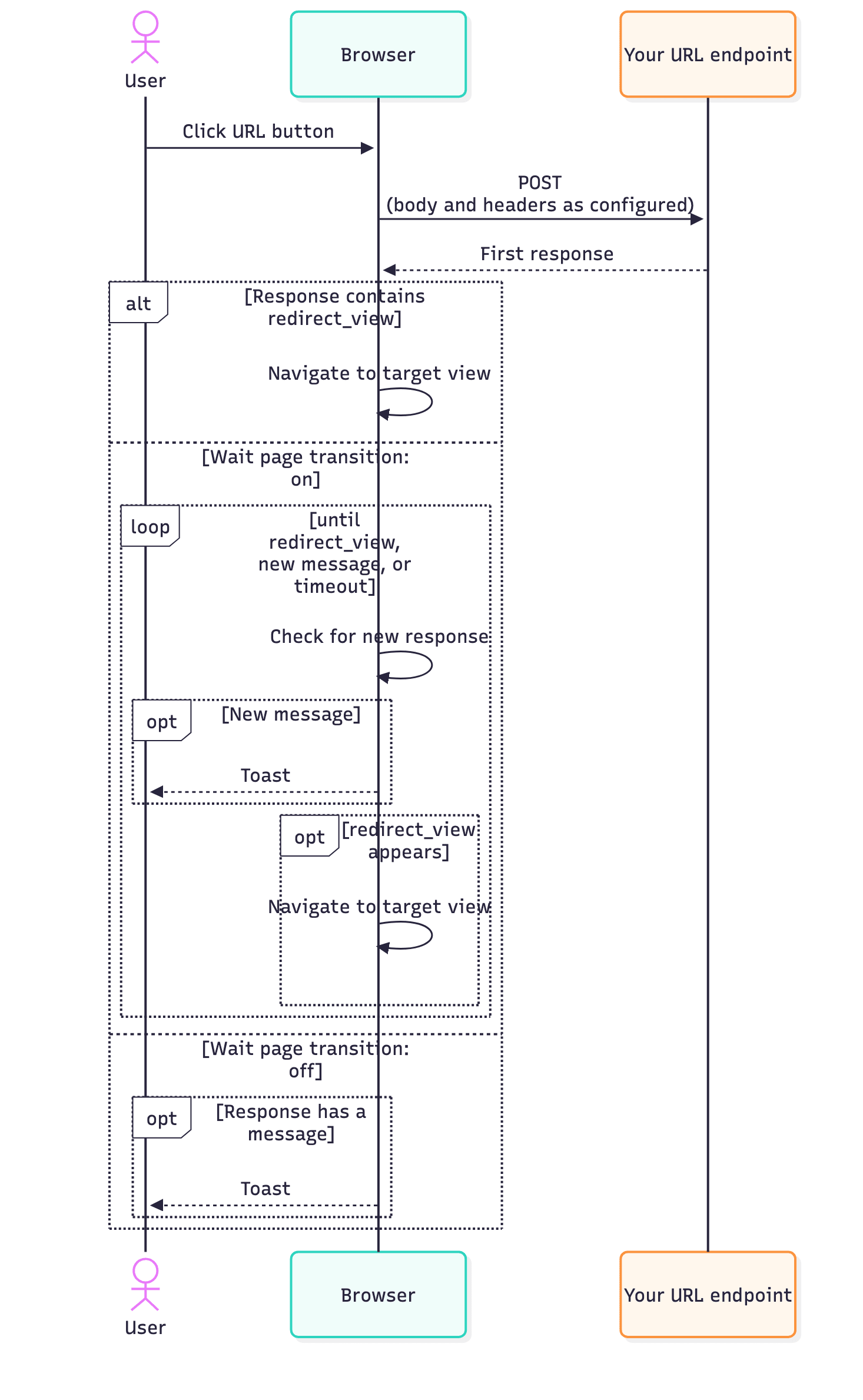
The first response
Section titled “The first response”The first response can be anything the HTTP Response Format reference accepts. The most common shapes:
oneclick_data.redirect_view— send the user straight to another view.oneclick_data.message— show a single info toast.oneclick_data.error_messageoroneclick_data.message_view— show a full-page message view.- An empty body or 2xx status with no
oneclick_data— the button is “fire-and-forget”.
Wait page transition
Section titled “Wait page transition”With Wait page transition off, the click is one round trip: the request goes out, the first response comes back, the browser reacts, done.
With it on, the button assumes the workflow your endpoint kicked off may want to talk back over time — for example to push progress messages. After the first response the browser keeps checking for new oneclick_data, and shows a toast for every new message until a redirect_view arrives or the configured timeout passes.
The polling interval scales with the timeout — short timeouts poll more often, long timeouts back off.
When something goes wrong
Section titled “When something goes wrong”| Outcome | What the user sees |
|---|---|
| Endpoint returned a 4xx or 5xx status | Error toast with the response body’s message, if any. |
Endpoint returned oneclick_data.error_message |
Full-page message view with title and message. The message can be a bullet list, and variant sets the colours and icon of the card (see HTTP Response Format). |
| Wait page transition exceeded the configured timeout | The polling stops and the last toast (if any) stays. The user is not navigated. |
| Network error while calling the endpoint | Error toast with the underlying message. |
Differences from form submissions
Section titled “Differences from form submissions”URL buttons and Form Submit Buttons both POST to your endpoint, but differ on:
- Trigger. Form submits run on form submission; URL buttons run on a single click without a form context.
- Body content. Forms send every input value keyed by name; URL buttons send the Button body data as configured.
- Polling. Form submits never poll — the first response is the only response. URL buttons can poll if Wait page transition is on.
- Validation. Form submits run input validation first; URL buttons have nothing to validate.
For the exact request shape, see Form Submission Types (forms) and the Button how-to (URL buttons).