Signed link
This page is for admins who make Buttons. The last part is also for the developers of the target page.
A Link button opens a URL in the browser. The target page cannot tell from the URL alone that the click came from OneClick. The Signed link section solves this. On each click, OneClick makes a new signed token and adds it to the URL as a query parameter. The target page verifies the token with a secret that only OneClick and the target page know.
A Link button without a Signed link opens the URL as it is.
How a signed click works
Section titled “How a signed click works”- A Pipedrive user clicks the Link button.
- The browser opens an empty window.
- OneClick checks the user and makes a token on the OneClick server. The token is signed with the secret.
- OneClick adds the token to the URL in the query parameter, for example
?oneclick_token=<token>. - The window opens the URL.
- The target page verifies the token and then shows its content.
If OneClick cannot make the token, it closes the window and the Panel shows an error. OneClick never opens the URL without the token. If the browser blocks the window, the error tells the user to allow pop-up windows for OneClick.
Add a Signed link
Section titled “Add a Signed link”- Open the Link button in the Button editor.
- Click Signed link in the menu. The section shows No Signed link added yet.
- Click Add a Signed link. OneClick makes a new secret and fills in the default values.
- Change Query parameter name and Token lifetime (seconds) if necessary.
- Copy the secret from Signing secret and give it to the developer of the target page.
- Click Save.
The settings
Section titled “The settings”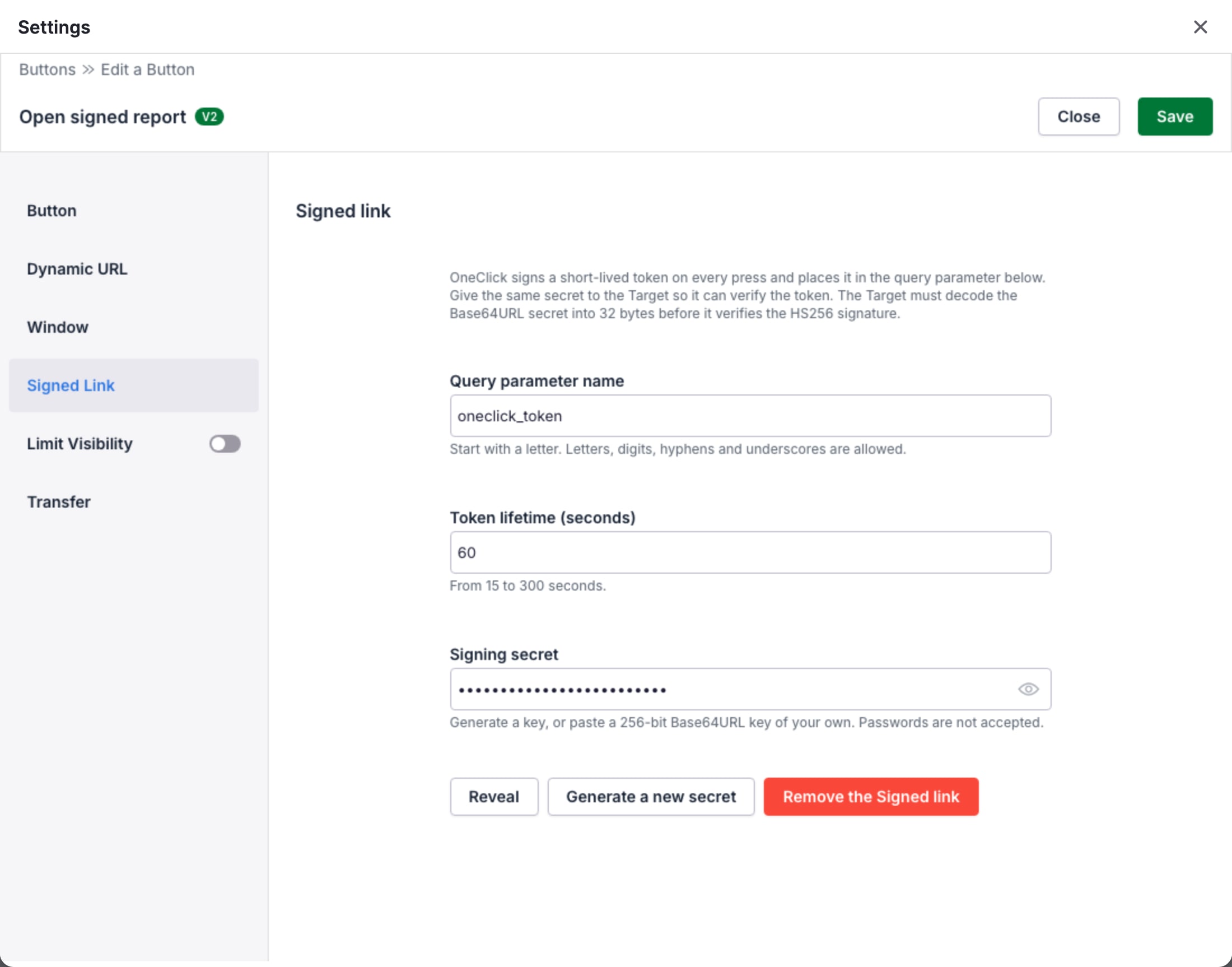
| Setting | Default | Rules |
|---|---|---|
| Query parameter name | oneclick_token |
Starts with a letter. Letters, digits, hyphens and underscores. 64 characters or less. |
| Token lifetime (seconds) | 60 | From 15 to 300 seconds. |
| Signing secret | A new random key | A 256-bit key in Base64URL text. Passwords are not accepted. |
If the URL already has a query parameter with the same name, OneClick replaces it with the token.
The signing secret
Section titled “The signing secret”Use the key that OneClick makes, or paste a 256-bit Base64URL key of your own. A key of 32 bytes is 43 characters
long, or 44 characters with the = padding at the end.
OneClick encrypts the secret and never sends it to the browser of a user. When you open the saved Button again, the field hides the secret:
- The admin who made the secret can click Reveal to show it again.
- For other admins, the secret stays hidden. They can still replace it or remove the Signed link.
Generate a new secret replaces the secret at once. Tokens with the old secret then fail. Give the new secret to the target page at the same time.
Remove the Signed link removes the setting. The Link button then opens the URL without a token.
Copies and transfers
Section titled “Copies and transfers”- A copy of the Button in the same Pipedrive company keeps the secret.
- A Button transfer to another Pipedrive company keeps the query parameter name and the token lifetime, but not the secret. The section then says that the Button carries no signing secret. Until an admin of that company generates a new secret, the Button opens the URL without a token.
Verify the token on the target page
Section titled “Verify the token on the target page”The token is a JSON Web Token (JWT) with the algorithm HS256. To
verify it, the target page does these steps:
- Read the token from the query parameter.
- Decode the Base64URL secret into its 32 bytes. Use these bytes as the HMAC key, not the text of the secret.
- Verify the
HS256signature with the key. Accept only the algorithmHS256. - Make sure that the time in
expis not in the past. - Use the claims, for example to find the Pipedrive user.
The token has these claims:
| Claim | Type | Value |
|---|---|---|
company_id |
number | The ID of the Pipedrive company. |
user_id |
number | The ID of the Pipedrive user who clicked the Button. |
is_user_admin |
boolean | true if the user is a Pipedrive admin. |
iat |
number | The time when OneClick made the token, in seconds since 1970. |
exp |
number | The time when the token expires, in seconds since 1970. |
The token does not contain the deal, the person or the organization. The URL can contain them, but they are not signed. Do not trust them for access control.
OneClick makes a new token for each click, but it does not prevent a second use of a token. If the target page must accept a token only one time, it must keep a list of the used tokens until they expire.
The is_user_admin value is never more than five minutes old: OneClick checks the admin status with Pipedrive again
when the stored status is older.
For an example in Node.js, see Verify a Signed link.