Getting started
What is OneClick
Section titled “What is OneClick”OneClick is a Pipedrive app that adds Buttons to Pipedrive. An admin makes the Buttons in OneClick. A Pipedrive user presses a Button to start a process at the correct time.
The problem that OneClick solves
Section titled “The problem that OneClick solves”Pipedrive has no custom buttons. An automation must find out by itself when to start. It must read many Pipedrive webhooks or read a filter again and again. Most of these webhooks and reads do not start a process. The user also does not see if the process started, completed or stopped with an error.
With OneClick, the user decides when the process starts. The user presses a Button, and OneClick shows the result to the user.
Where the Buttons are
Section titled “Where the Buttons are”The Panel is the OneClick area in the sidebar of a Pipedrive deal, person or organization. A Button in the Panel belongs to that record.
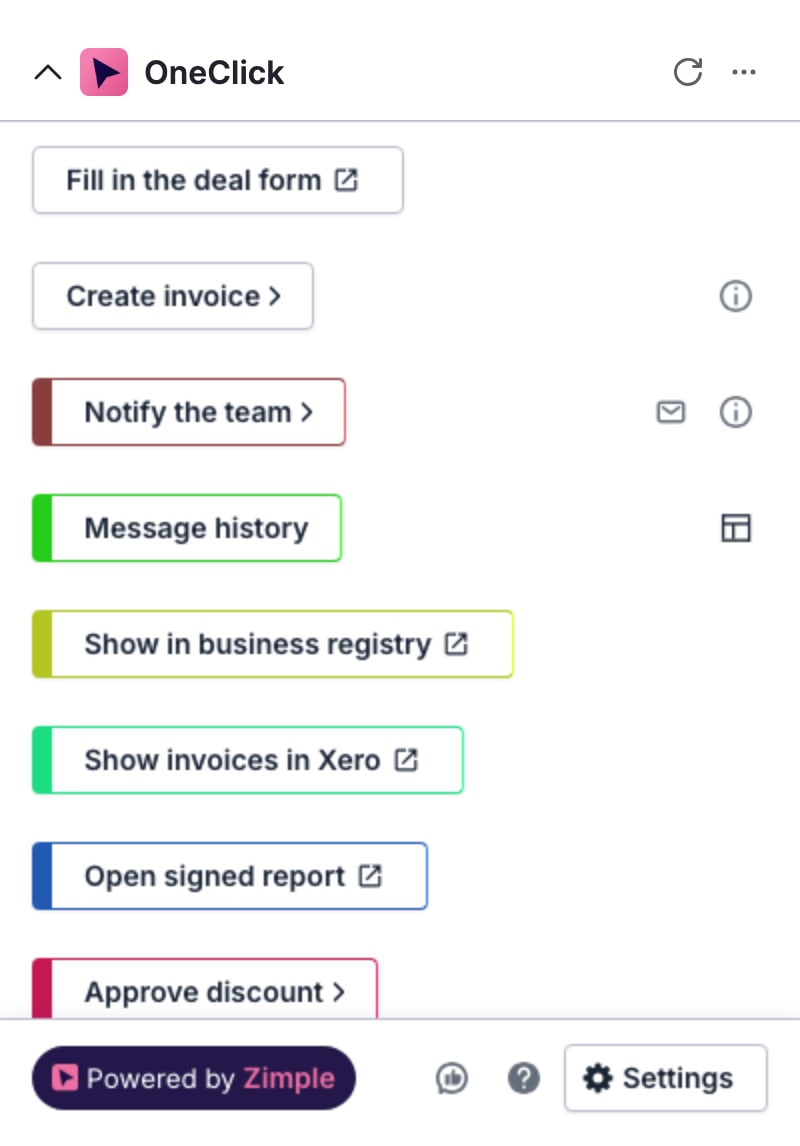
The Floating window floats over Pipedrive and stays open when the user moves to another page. A Button in the Floating window belongs to no record.
What a Button does
Section titled “What a Button does”OneClick has three Button types:
- A Workflow button sends the data of the Pipedrive record to a URL. The URL can be a Make scenario, a Zapier Zap or your own server. The data can include field values, user data and deal products.
- A Link button opens a URL that it makes from the Pipedrive field values.
- An Interface button opens an Interface view. The admin builds the Interface view in Interface Builder.
A Button can ask the user to fill in fields before OneClick sends the data. Required fields must have a value. Your automation can send messages back to the user, for example the status of the process.
Steps to start
Section titled “Steps to start”- A Pipedrive global admin installs OneClick. See Install OneClick as a global admin.
- The admin makes the Buttons in the OneClick settings. See Buttons.
- Each user installs OneClick. See Install OneClick as a user.
- The users press the Buttons. See Use Buttons.
Pipedrive apps are user specific: each user installs OneClick for himself or herself. The Buttons and the settings apply to all users in the company.